October 1 - December 31
GiveSmart Events
New Features:
OTA via SMS
OTP via SMS adds an important layer of security for donors which authenticates the new card transactions through One passcodes and enhances security measures for the GS events platform. This feature is behind a feature flag which can be enabled/disbaled through UI. We also have a global flag which can be used to enable the feature across all the organizations.
OTP is triggered only when a new credit card is added for any payment path on Donor sites and excludes Cards-on-file, Apple Pay, Google Pay. We have renamed the existing Multi-factor Authentication Admin setting to One-Time Passcode. This setting live in the Org Hub → Campaigns → Settings → OTP (One-Time Passcode) and is accessible by Org Hub admins/Employee users who have access to Org Hub Settings. Default will be disabled for all the Orgs except for the one's that had it enabled by choice.
Organizations can select the effective OTP Method as SMS OR Email. If there is no preference selected in case of a global switch, we would default the OTP Method to SMS OR we would retain the OTP Method if any Org had enabled the feature
The OTP prompt is introduced after a donor clicks the Pay Button when adding a new card. The system prioritises the Admin's selected method but ensures no donor is blocked from completing a payment.
Tokenized Cards no longer copy over when duplicating a site
To mitigate potential future card failures and further harden our security measures for credit card payments, we will no longer carry over tokenized card information to new sites when existing sites are copied. The user's other data would continue to be copied. Please see the screenshot below for the helper text information. 
Improvements:
- Hide finalized banner for donor level users
- Improve Finalized State for Event Site
- Display User-friendly AVS Error Message when Adding/paying on a new card
- Remove Automatic lockout behavior at term end
Bug Fixes:
- Terms & Conditions Removed When Creating/Copying Event Sites on Bundled Organizations
GiveSmart Fundraise
New Features:
Clover Go available on Fundraise App
Admins using the FUNDRAISE Admin App can capture credit cards with an Insert/Tap option via Clover Go, providing our partners with a more modern and flexible approach to capturing credit cards at their in-person events.
Who can interact with Clover Go?
- All Org, Campaign, and volunteer admins using the GiveSmart Fundraise Admin App can choose to Bluetooth pair a Clover Go device to support credit card and payment capture.
- Locations to Interact with Clover Go Fundraise
Donation card Reader Payment screens
GiveSmart Donor CRM
New Features:
Data Mapping Tool
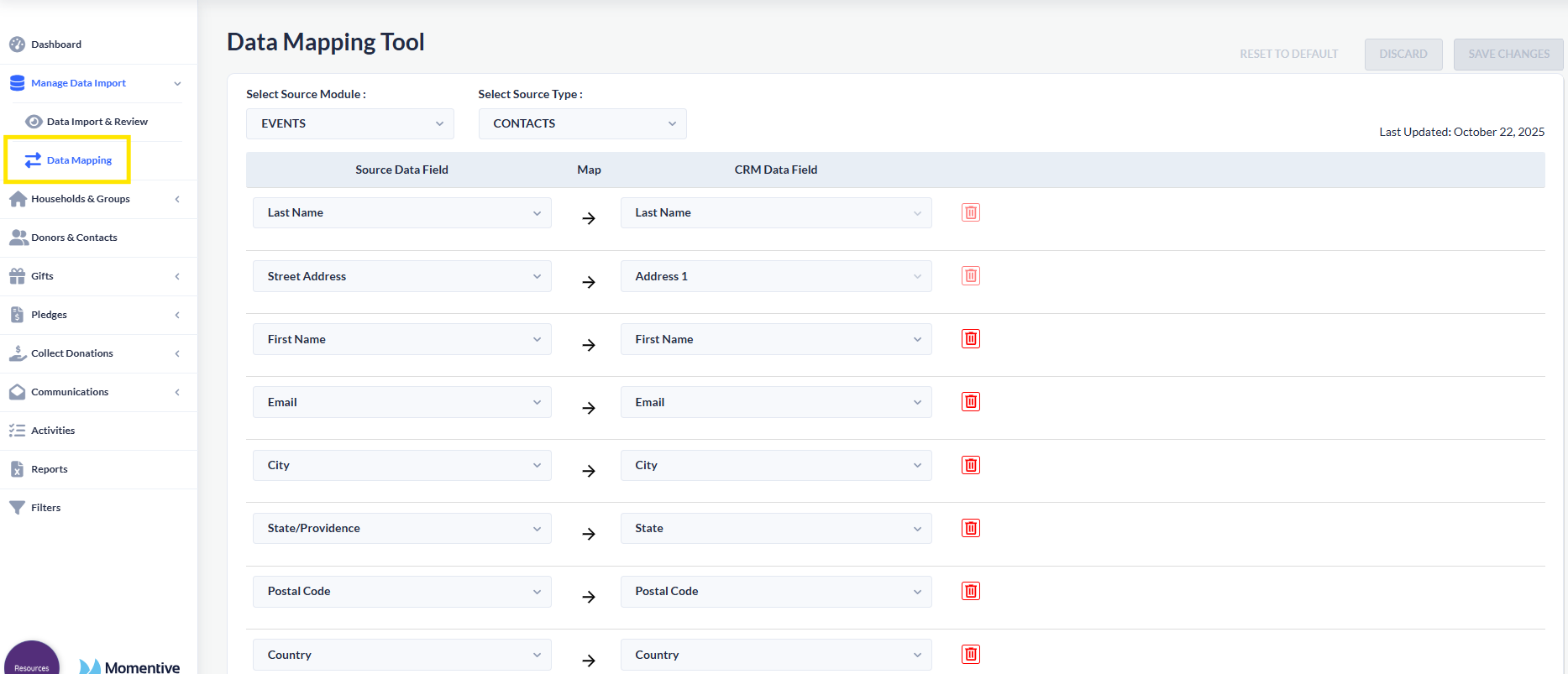
The Data Mapping Tool empowers client admins to configure how data from sources like Events and Fundraise (Contacts and Transactions) maps to corresponding CRM fields.
Admins can easily define, edit, or delete mappings- for example, mapping an Email field from Events to a Notes field in CRM ensures that the value sent in email field from Events side gets populated in Notes field within CRM cause of the customized mapping.
The tool also provides flexibility to:
View preloaded default mappings on first load.
Save, discard or reset mappings to default configurations.
Overall, this tool gives admins full control over how source data is integrated into CRM, ensuring accuracy, flexibility and alignment with each client’s data flow preferences.
Improvements:
- Direct Import of Events & Fundraise Contacts & Transaction Files into CRM via Manual Import
- Remove Titles from All Organization Records for All Clients
- Improve Gift Entry Logic for In-Kind Goods or Services and Stocks
Bug Fixes:
- Thank You Letters & Emails- Resolution of Blockquote Formatting Issue
- Anonymous Transactions Banner- For anonymous transaction notifications, new anonymous transactions now appear accurately after a page refresh
- Donor Search Data for Contacts
- 'Add New Gift' button on Congratulations screen now navigates accurately to the Donor Add New Gift screen
- Quick Gift Entry Templates || Selected Values Are Not Persisting When Creating or Applying Gift Templates
- Transactions not imported or linked to Contacts after completing Xporter import
- Activities- Add to Calendar Function Not Working
- Email Campaign- Text Alignment Not Retained: Center-Aligned Text Shifts to Left After Sending Email