One-Time Passcode (OTP) is a security measure helps verify your users' identity and safeguard their personal information. There are no steps or settings to configure for admin.
One-Time Passcode Trigger Locations
Users will be prompted with the OTP SMS or email verification applicable on all the paths for paying with a card/adding a card on file (Donate Now, Pay Tab, Order Forms (ticketing or custom), etc.)
- Homepage Order Form
- Custom Order Form
- Donate Now Form
- Champions P2P
- MY INFO > Add Card on File
- Self Check-In
- PAY tab
- Instant/Raffle/Vote items set to Immediate Checkout
- Adding card on file in order to bid (Global Setting requiring card on file to bid)
- Email/SMS with campaign link to add card on file
User Experience
Users will be prompted to enter the code they received via SMS to the number on file:
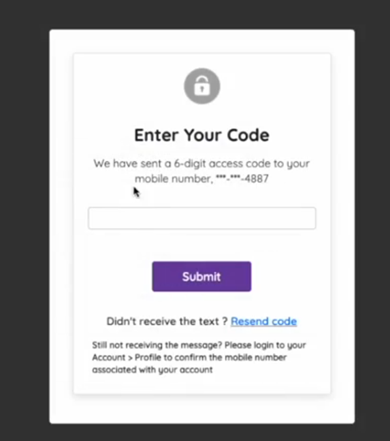
Users who have opted out of receiving SMS messages, no number on file or entered a landline phone will receive their code via email.

Step 1: User selects "Add Card On File" from one of the following locations:
My Info Tab: 
Item Description Page: Self Check-in:


Step 2: User enters their credit card information: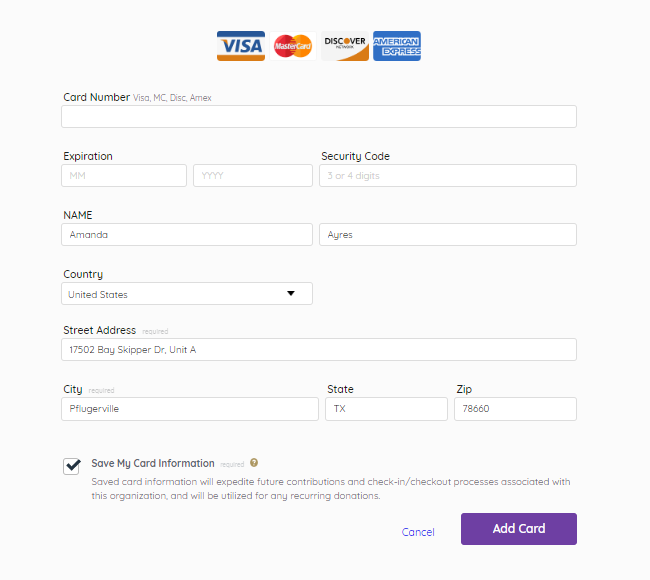 Step 3: User selects 'Add Card', which generates an SMS or Email with a 6-digit code to be sent:
 Step 3: User selects 'Add Card', which generates an SMS or Email with a 6-digit code to be sent: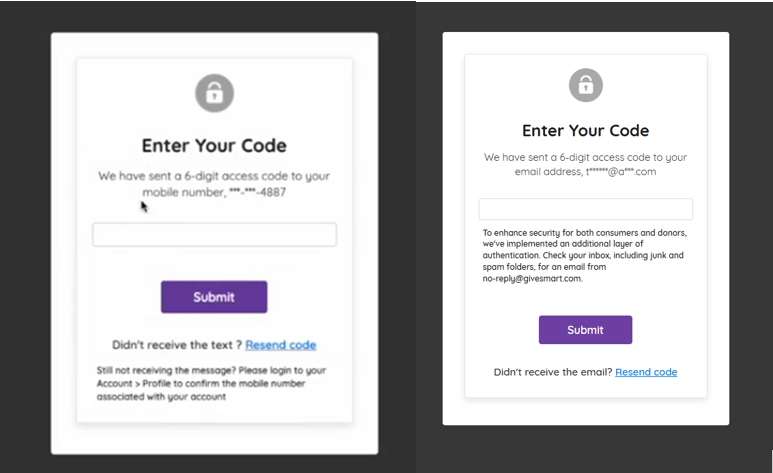
- Email on file: An email is generated automatically.
- No email on file: A pop-up will appear prompting them to add one. Once entered and submitted, the email will be sent:
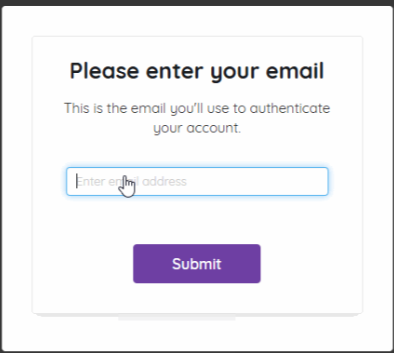
Step 4: User copies the 6-digit code and enters in the validation popup:

Organization Users
For Organization users, the One-Time Passcode (OTP) will be sent to the Organization's primary point of contact so they can authenticate payments successfully on behalf of the Organization.

If Primary Point of contact has opted out of SMS, then the OTP would be sent to their email

The Importance of OTP for You and Your Donors
With a commitment to balancing ease of use with the highest level of security our customers and donors expect, One-Time Passcode (OTP) security measure is enabled for all GiveSmart customers. This next level of protection enforces even more security for your donors’ identity and safeguards their personal information when completing payments on the GiveSmart platform.
What This Means for You
One-Time Passcode (OTP) will be enabled on all sites in your Events account. No additional action is needed on your part.
What This Means for Your Donors
When adding a card on file on Event sites, donors will be prompted to verify their identity through a one-time code sent to their email or mobile number.
FAQs
If being checked in to an event, does the guest have to authenticate when swiping a card?
- No, when a volunteer or admin swipes a card with a volunteer during the checkin process, the OTP verification email step is not necessary.
When an admin is adding a card on behalf of a guest, will the OTP authentication email be triggered?
- No, when a volunteer or admin enters a card on file on behalf of a guest, OTP is not required.
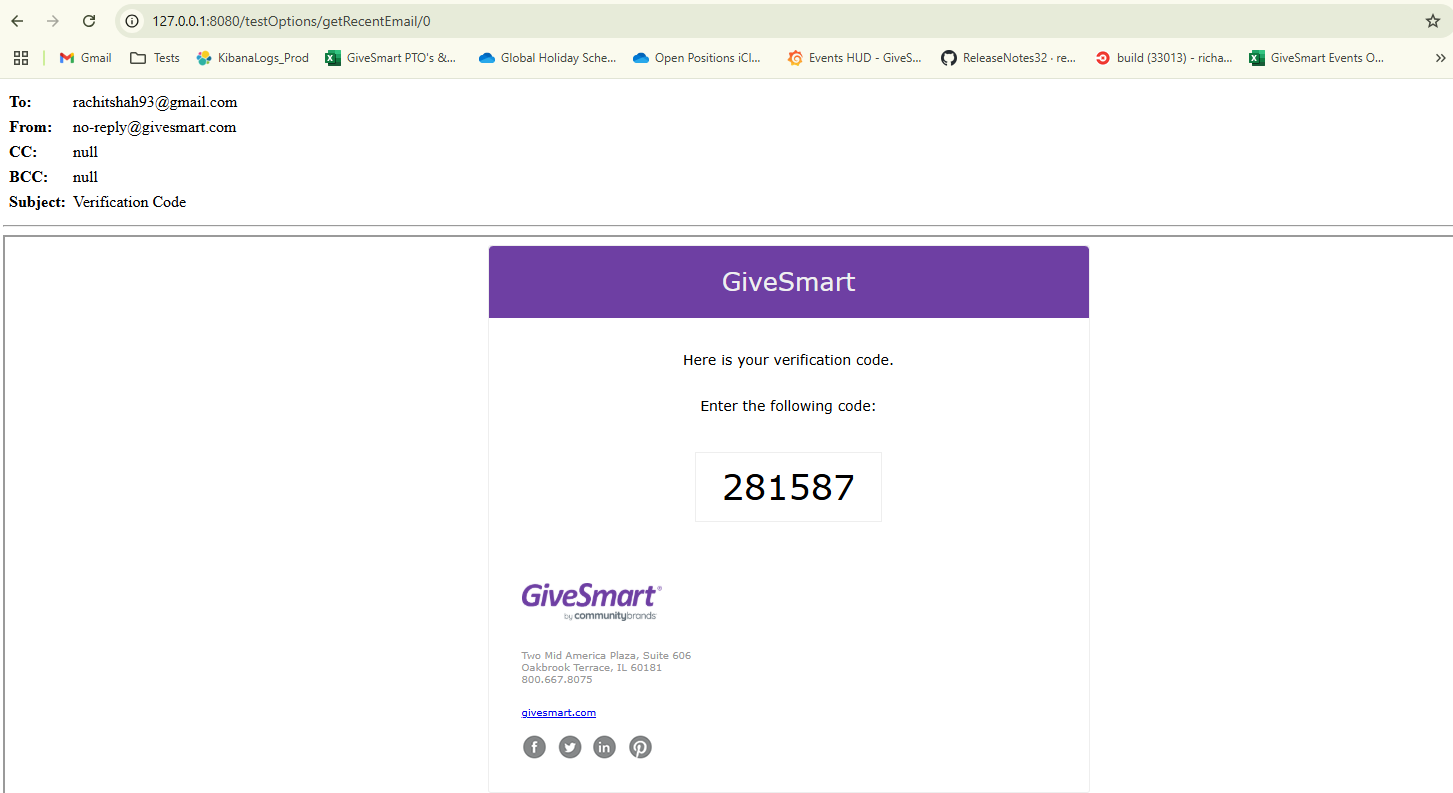
What does the OTP email verification look like?
- The verification code email will be sent from no-reply@givesmart.com, and will contain the following information.
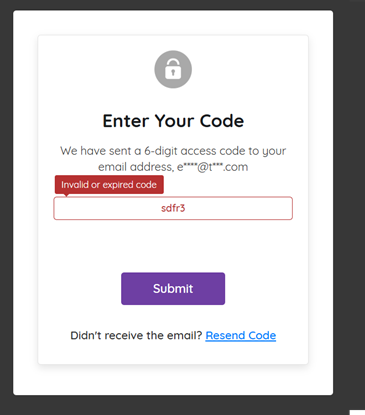
What happens if the user enters an incorrect code?
- If the code is entered incorrectly, the code is removed, the box turns red, and a message will appear noting the code is either invalid or has expired.
Can a user resend a code if the code has expired?
- Yes, a user can simply click the Resend Code link located at the bottom of the verification window.
Why is One-Time Passcode important?
- By enabling this additional step in the card adding process, this protects your organization from fraudulent credit card attempts on your payment forms.
- To learn more about card testing, click here.
The donor didn't receive the text or email, where should they look?
- Ensure they have not opted out of receiving SMS messages and the number on file is correct.
- The email will be received from no-reply@givesmart.com which might have been caught in their spam filter. Please instruct the donor to search their spam file before resending the message.
- If still not received, verify the email on file by clicking their initials in the top right corner > Click Profile > Verify email on file. Updated if necessary.
What is the validity of the One-Time Passcode?
- The code is valid for 10 minutes
Where can a user view/update the email on their account?
- Users can update the email on their account by clicking on their initials in the top right corner of an Events site > select Profile from the dropdown > update the email and save.
Is there a location where I can see users who didn't enter the code?
- No, we do not track users who did not enter the code.
If a user is prompted to enter an email via the popup, is the email entered saved to their profile?
- No, at this time, the email entered in the popup is not saved to the user's profile.
Who receives the one-time passcode for Organization users?
- OTP will be sent to the primary point of contact's mobile number or if opted out of SMS, the primary contact's email
For the Pay tab or My Info, primary point of contact details are not captured while completing a payment or adding a card on file. In such cases, where will the One-Time Passcode be sent?
- Organizations will be able to enter an email address where they would like to receive the OTP for authentication
Does a transaction have to successfully pass OTP verification before the payment request is sent to CardPointe?
- No. GiveSmart requires a successfully verified code before a payment can process. Donors can't skip or bypass the OTP step on standard payment forms. If a donor enters the wrong code or the code expires, they'll see an error and can request a new one. But the donation won't go through until verification is complete. If a donor is having trouble receiving their code ( wrong number, delivery issue, etc.) Apple Pay, Google Pay, PayPal, and Venmo all bypass OTP entirely, since they use their own built-in authentication. Pointing donors to one of those options is the fastest workaround.
Are there limits on unsuccessful OTP attempts before a user is blocked?
- GiveSmart doesn't limit failed passcode attempts at this time. We do show an error for incorrect or expired entries, and donors can request a new code at any time. Each resend invalidates the previous one. Codes expire after 10 minutes. If a donor can't receive or complete OTP, Apple Pay, Google Pay, PayPal, and Venmo all bypass the OTP requirement entirely and are a practical alternative to keep donations moving.
Does GiveSmart's OTP restrict VoIP or disposable phone numbers?
- GiveSmart's OTP (one-time passcode) verification sends a PIN via SMS to confirm your phone number at login. The system is built for traditional US carriers — AT&T, Verizon, T-Mobile, Sprint, Cricket, Boost, Virgin Mobile, U.S. Cellular, and MetroPCS. GiveSmart does not publish a specific policy on blocking VoIP, temporary, or disposable numbers. That said, delivery to those number types is not guaranteed, and the platform's terms require clients to provide accurate contact information. If you're running into verification issues with a specific number type, reach out to GiveSmart support directly — they can confirm what's supported for your situation.
Does OTP protect against card testing?
- Yes, in fact, this is one of the primary reasons GiveSmart built OTP into their payment forms. Card testers use automated tools to run large numbers of small transactions and check which card numbers go through. OTP stops that pattern cold: every payment attempt requires a real person to receive and enter a one-time code, so automated scripts can't complete transactions at scale.
If a card tester gets past OTP, are there other controls that catch them?
- Yes. OTP is one layer, not the only one. At the payment processor level, AVS (Address Verification System) and CVV checks are performed on every transaction. Card testers typically don't have the correct billing zip code or CVV for stolen card numbers. A mismatch on either declines the transaction automatically, before it ever settles. Beyond that, your forms are also protected by reCAPTCHA, firewall rules, velocity, and rate limits. If any transactions do slip through all those layers and are later confirmed as card testing, GiveSmart will work with you to void and refund them, removing them from your account so you're not left holding potential chargebacks.
What should we monitor now that OTP is enabled?
- OTP, along with our other security layers, significantly reduces exposure to card testing, but it's still worth monitoring your transaction activity. Watch for unexpected spikes in volume, clusters of small-dollar donations in a short window, repeated transactions with similar donor information, and any uptick in refunds, chargebacks, or donor disputes. If you spot a pattern that appears to be card testing, contact GiveSmart support right away. They review and act on flagged activity daily
When will transactions identified as card testing appear as refunded or voided?
- Timing can vary depending on processor and banking networks. Voids generally appear more quickly than refunds, while posted refunds may take several business days to appear in the cardholder's account. We can review any specific transactions you are concerned about and provide additional status updates.